



Work in progress report
17 views · by Kevin J Bruno · updated 4 days ago
The Work in progress report (WIP) shows, for every active project, how much fee the firm has earned by doing the work against how much it has billed, the value of approved hours that haven't been invoiced yet, and how much the client still owes. Use it at month end to decide what to invoice, to spot projects where billing has fallen behind the work (money the firm is effectively lending the client) or run ahead of it, and to chase unpaid invoices.
Where to find it
- Sidebar → Reports → All reports, then the Work in progress card.
- Jump to… (Ctrl K): type
work in progress.
Who can use it
The Reports group is for people who can see the firm's reports. By default that is Business Owners, Admins, Project Managers, IT Staff, BIM Managers and Human Resources. Everyone in those roles sees the same numbers for the whole firm; reports are not filtered to your own projects. Users don't have the Reports group in their sidebar and can't open report pages. Being a Project Manager on a project's team is not enough; the permission comes from the firm role.
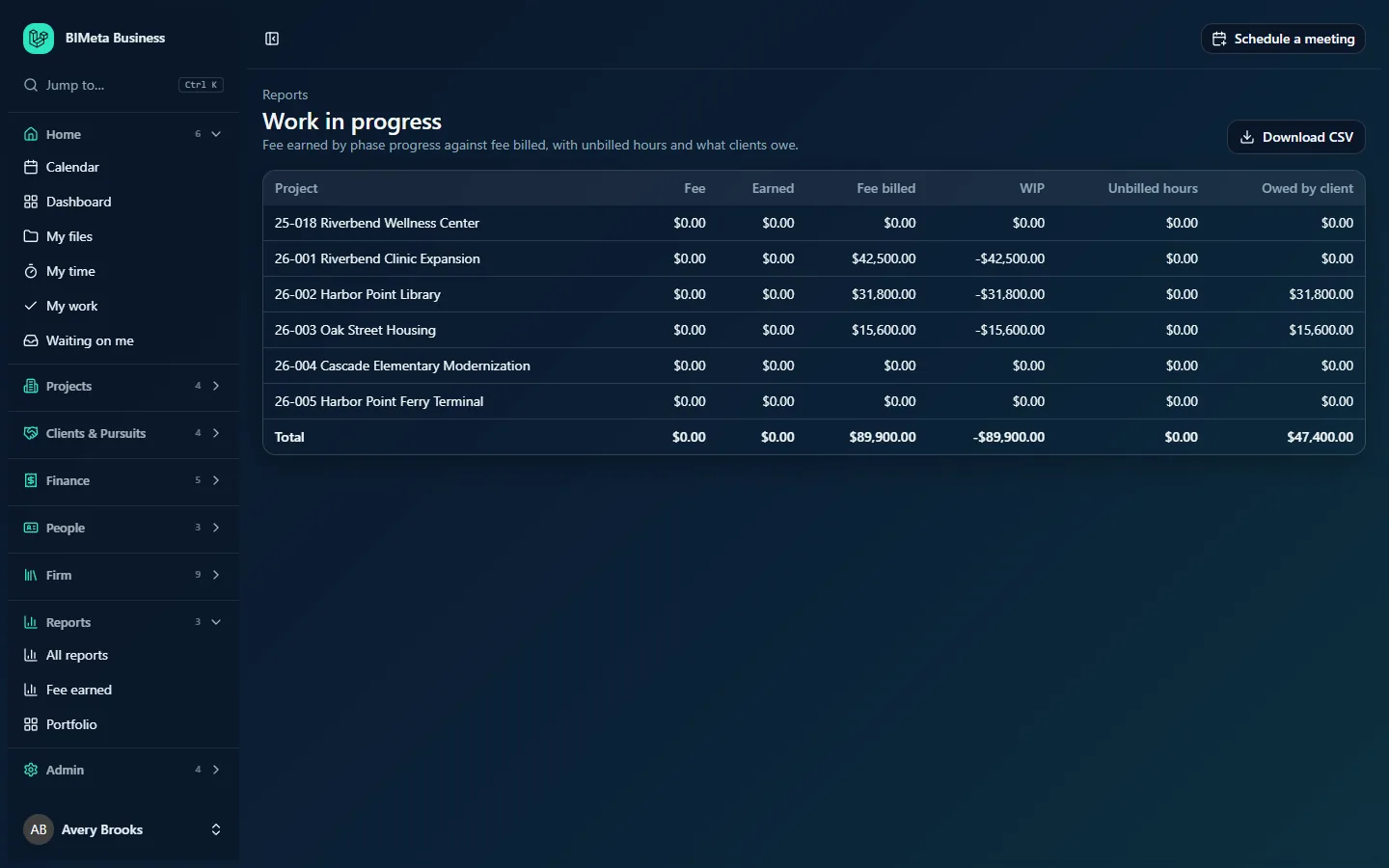
Shown here as an IT Staff member at Northlight Architects sees it; everyone who can open the report sees the same firm-wide figures.
A tour of the page
One row per active project, in project-number order. The columns, left to right:
| Column | What it means | How it's calculated |
|---|---|---|
| Project | Project number and name. | Every project with status active. |
| Fee | The project's total fee. | All phase fees from the project's Budget tab: baseline scope fees plus approved Additional Services. |
| Earned | Fee earned by the work done so far. | For each phase, phase fee × percent complete (set on Fee earned), added up. |
| Fee billed | How much of the fee has been invoiced. | The phase-fee lines on the project's invoices. Hourly, expense and consultant lines don't count here, and draft and void invoices are ignored. |
| WIP | Earned but not yet billed. | Earned − Fee billed. Positive: work done that you can invoice. Negative: you've billed ahead of the work. |
| Unbilled hours | The value of hours not yet invoiced, shown as money (not a number of hours). | Approved, billable timesheet hours on the project that aren't on any invoice yet, each at the bill rate in force when it was worked. |
| Owed by client | What the client still has to pay. | The total (including tax) of the project's issued invoices, minus payments recorded against them. Draft and void invoices are ignored. |
The report has no filters: it is always "as of now", across each project's whole history.
The table and its totals
- A Reports link above the title takes you back to All reports.
- Money is shown in the firm's currency (set in the firm profile under Admin → Settings → Setup), formatted for your browser's language.
- The last row, Total, adds up the money and hours columns. Percentage columns are left blank there, because adding percentages gives nonsense.
- When there's nothing to show, the table says Nothing to report yet.
Download CSV
The Download CSV button saves the report, with the same filters, as a spreadsheet file named like bimeta-wip-20261005.csv. Things to know about the file:
- It opens directly in Excel with accented characters intact.
- Money is written as plain numbers with two decimals and no currency symbol (for example
42500.00), so you can do sums on it; percentages keep their%sign. - It has one row per table row and no totals row.
- Each download is recorded in the firm's audit log, with the number of rows.
How to read the numbers
- Large positive WIP: the team has progressed phases that haven't been billed. If the contract allows, invoice the earned amount.
- Negative WIP: more has been billed than earned. That's normal for retainers or front-loaded billing, but it can also mean percent complete hasn't been updated. In the example firm Northlight Architects, 26-001 Riverbend Clinic Expansion shows Fee billed $42,500.00 and WIP −$42,500.00, because invoices were issued but no phase fees or progress have been entered yet, so Earned is $0.00.
- Unbilled hours matters for hourly work and for spotting time that will never be billed on fixed-fee work.
- Owed by client: in the example, 26-002 Harbor Point Library has $31,800.00 billed and $31,800.00 owed (unpaid), while Riverbend has $0.00 owed (paid in full). The Total row shows $47,400.00 owed across the firm.
How to…
Do a month-end WIP review
- Ask Project Managers to update each phase's percent complete on Reports → Fee earned.
- Make sure timesheets for the month are approved (Finance → Time approvals).
- Open Work in progress, sort out positive WIP and unbilled hours into invoices on Finance → Invoices.
- Use Owed by client to follow up on unpaid invoices.
- Click Download CSV to keep a month-end copy.
Tips and good to know
- Fee billed and Owed by client are measured differently: Fee billed counts only phase-fee lines before tax; Owed by client uses whole invoice totals including tax, hourly work, expenses and consultant pass-throughs. So Owed by client can be larger than Fee billed.
- Only approved hours count in Unbilled hours. Submitted hours waiting for approval don't appear until approved.
- If bill rates aren't set under Admin → Settings → Rates, Unbilled hours shows $0.00 even when hours exist.
Troubleshooting
Earned is $0.00 on every project.
Either no phase fees have been entered (project Budget tab) or no percent complete has been set (Fee earned).
A project is missing.
Only active projects are listed. Projects on hold, complete or archived are left out.
Was this article helpful?
Share