



Rates: set people's hourly bill and cost rates
20 views · by Kevin J Bruno · updated 3 days ago
Rates is where you set what an hour of each person's time is worth. The bill rate values their hours for fee earned (what the work is worth to the client); the cost rate is what an hour costs the firm (salary and overheads). Together they drive the Fee earned report and project budget figures. Each new rate applies from a date you choose, and hours that were already approved keep the rate they were approved at, so changing a rate never rewrites history.
Where to find it
- Sidebar → Admin → Settings, then Rates in the Billing section. You can also type in Search settings at the top of the Settings page. A ‹ Settings link above the page title takes you back.
- Ctrl K and type
rates,billing rates,hourlyorcost.
Who can use it
Business Owners and Admins, who can set people's hourly bill and cost rates. IT Staff, BIM Managers, Project Managers and Users can't open it, so people's rates stay private to the firm's leadership.
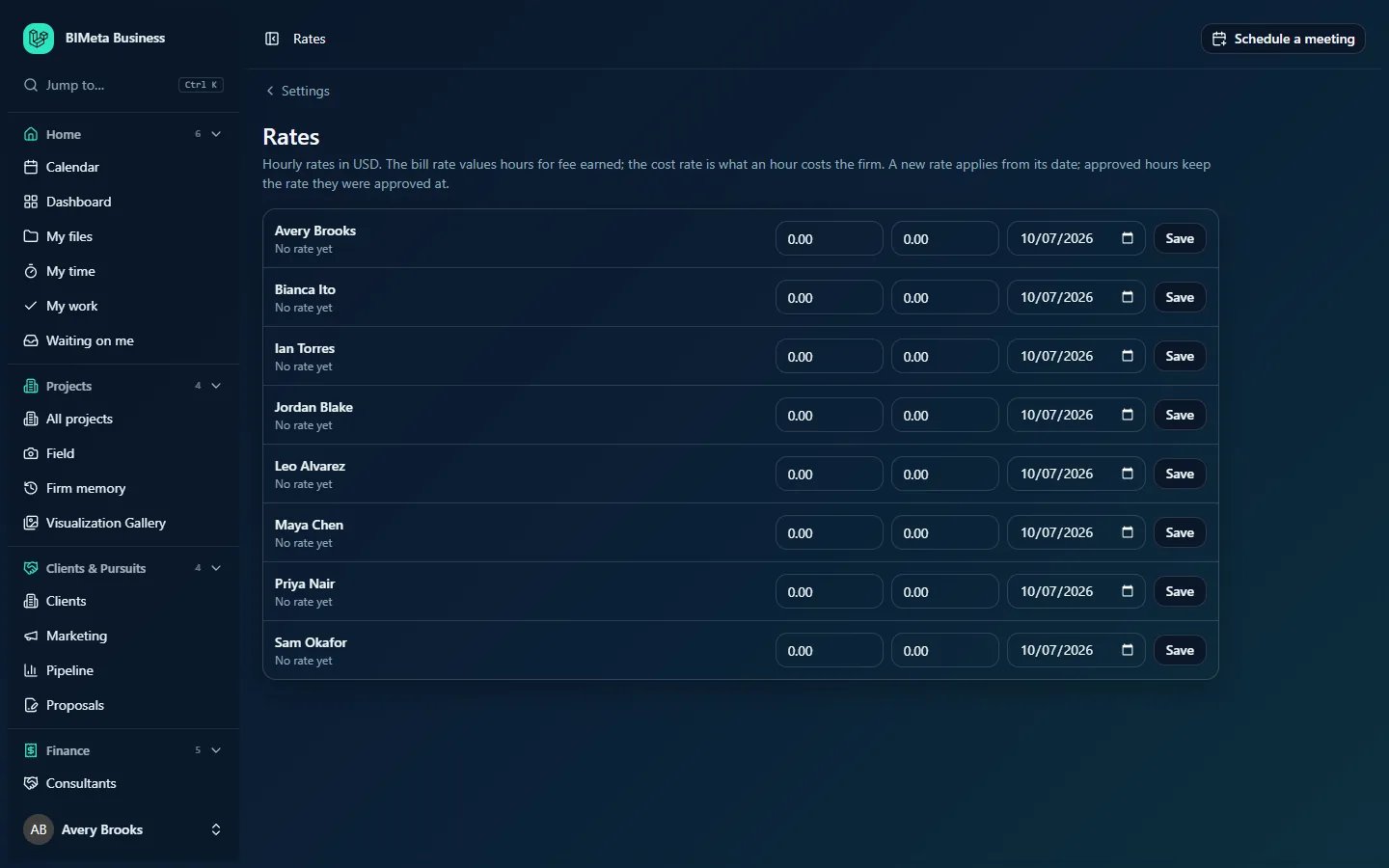
A tour of the page
The line under the title gives the rules in brief, including the currency, for example Hourly rates in USD. The currency is your firm's currency, set in the Firm profile & region step of Admin → Settings → Setup.
Below is one row per active person, in name order (for example Avery Brooks, Bianca Ito, Ian Torres at the example firm Northlight Architects). Each row has, from left to right:
- The person's name and, underneath, Since date (when their current rate started) or No rate yet.
- The bill rate box (per hour), showing their current bill rate, or 0.00.
- The cost rate box (per hour), showing their current cost rate, or 0.00.
- The From date, filled in with today.
- A Save button for that row.
The boxes have no headings on screen: the first number is always the bill rate and the second the cost rate.
How to set or change someone's rates
- Find the person's row.
- Type the bill rate per hour, for example
150or150.00. - Type the cost rate per hour, for example
62.50. - Set the From date the new rates apply from. Today is filled in; choose a future date for a planned raise (for example the start of next quarter) or an earlier date to cover hours not yet approved.
- Click Save on that row. You'll see Rates saved, and the row shows Since the date.
Both rates are required each time (enter 0 if you don't use one). Rates can be from 0 to 10,000 per hour, with up to two decimals. Each change is recorded in the Audit log (with the date, not the amounts).
How rates are used
- When someone logs hours in My time, each entry takes the person's rates in force on the day worked.
- When you save a new rate, hours from its From date that aren't approved yet (drafts, submitted or sent back) are updated to the new rate. Hours already approved on Finance → Time approvals keep their rate.
- Reports → Fee earned compares, for each phase of a project, the fee earned (the phase fee times the percent complete the Project Manager reports) with the hours spent valued at bill and cost rates, so you can see whether a phase is making or losing money.
- Cost rates are also used in fee forecasts of what upcoming hours will cost.
Tips and good to know
- Set rates before people start logging time on a new project, so the first approvals use the right figures.
- Saving one row only changes that person; other rows are untouched.
- People who have left (switched off) aren't listed. Their past hours keep their approved rates.
- The rate history is kept: a new rate from a date doesn't delete the earlier one. Saving again with the same From date replaces the rate for that date.
- Rates can also be read (but not changed) through the data API as Billing and cost rates, by keys and apps with time access; switch that item off on Admin → Settings → API & connected apps if you'd rather it stayed in the portal.
Troubleshooting / FAQ
I changed a rate but Fee earned didn't change.
Approved hours keep the rate they were approved at. Only hours on or after the new rate's From date that weren't approved yet, and hours logged from now on, use the new rate.
A new employee isn't listed.
Only active people are listed. Check their account is switched on under Admin → Settings → People & access, then reload.
Why can't my Project Managers see rates?
Rates are limited to Business Owners and Admins. Project Managers see the results in reports instead.
Was this article helpful?
Share