



Project team: add people and set their project role
17 views · by Kevin J Bruno · updated 12 hours ago
The Team tab lists the people working on a project and the role each one has on it. The project role matters: it decides what people without firm-wide rights can do on this project (edit it, see its budget, answer RFIs and so on), and only team members, plus people who can see every project, can be assigned the project's tasks.
Where to find it
Open a project (Sidebar → Projects → All projects, then the project's name) and choose the Team tab, the last tab in the Project group.
Who can use it
- Everyone who can see the project can see who's on the team and their roles.
- Adding, changing and removing people needs permission to manage the project team: Business Owner, IT Staff, BIM Manager, Admins and Project Managers, or the person who is this project's Project Manager. A User without that project role sees the list with each person's role as plain text, and no form.
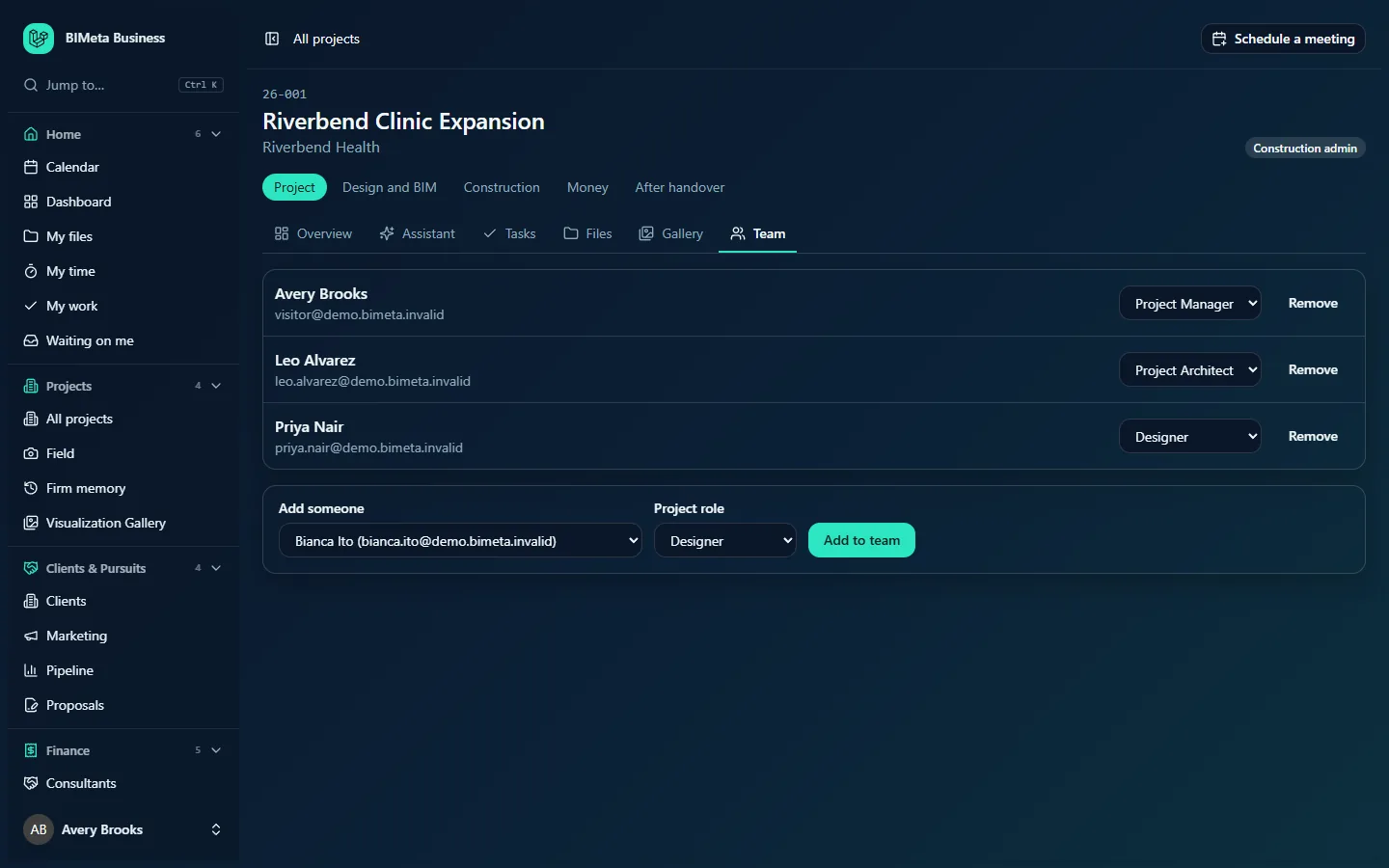
A tour of the page
Team list
One row per team member with their name and email, e.g. Leo Alvarez. On the right:
- For people who can manage the team: a project role drop-down (changing it saves straight away) and a Remove button.
- For everyone else: the role name, e.g. Project Architect.
An empty team shows "Nobody is on this project team yet."
Add someone
Shown to people who can manage the team, as long as there's anyone left to add:
- Add someone: everyone in the firm who is active or invited and not yet on the team, shown as name (email).
- Project role: defaults to Designer.
- Add to team saves.
Project roles
| Role | On this project they can… |
|---|---|
| Project Manager | Edit the project, move it to the next phase, see and manage the budget (scope, baseline, Additional Services decisions), manage the team, approve time, run construction admin (RFIs, submittals, changes, punch, meetings, specs, closeout), field, bidding and permits, and use the Assistant. |
| Project Architect | Edit the project, see the budget, run construction admin, field and permits, see bidding, and use the Assistant. |
| Designer | Edit the project (tasks, files, drawings and so on), read construction admin and answer RFIs and submittals in their court, see and capture field records, respond to permit comments, and use the Assistant. |
| Consultant | See the project and its construction admin, and answer RFIs and submittals in their court. |
| Client | Same as Consultant. |
A project role only ever adds rights on this project. It never takes away what someone's firm role already allows: a Business Owner listed as Designer still has full access.
How to …
Add someone to the team
- Under Add someone, pick the person.
- Choose their Project role.
- Click Add to team. You'll see "Team updated" and they appear in the list.
Change someone's project role
- Pick the new role in the drop-down on their row. It's saved at once ("Team updated").
Remove someone
- Click Remove on their row.
- They're taken off the team at once. Any of their tasks on this project that aren't done become unassigned ("Removed from the team. Their open tasks are unassigned.").
Every add, change and removal is recorded in the audit log.
Tips and good to know
- Invited people (who haven't signed in yet) can be added, so you can set up the team before they start.
- Clients and consultants with portal accounts only see projects they're on, so adding them here is what gives them access. Give them the Client or Consultant role.
- Tasks can be given to team members and to anyone whose firm role lets them see every project. To give a task to a client or consultant, add them to the team first.
- The Team card on the Overview counts the people listed here.
Troubleshooting
The person I want isn't in the Add someone list.
They're already on the team, or their account isn't active or invited (for example it was suspended). Check Admin → Settings → People & access.
"That person isn't active in the firm."
Their account was deactivated after the page loaded. Reload the page.
I can see the team but can't change anything.
Only people who manage project teams, or the project's Project Manager, can. Ask them.
Was this article helpful?
Share