



Budget: scope of services, fee and Additional Services
16 views · by Kevin J Bruno · updated 5 days ago
The Budget tab holds the project's fee: the scope of services you contracted for, line by line and phase by phase, and every change to it after the contract was agreed. Once the baseline is locked, scope and fee only change through numbered Additional Services requests that a project manager approves or rejects, so the current contract value is always traceable. For people who see the firm's reports, it also shows Fee health: what's been earned and spent, and whether the fee will last.
Where to find it
Open a project and choose Money → Budget.
Who can use it
- Seeing the tab needs permission to see fees and budget: Business Owner, IT Staff, BIM Manager, Admin and Project Manager roles, or a project role of Project Manager or Project Architect. Regular Users without one of those project roles don't see the tab.
- Adding and removing scope lines, splitting the fee, locking the baseline and approving or rejecting requests need permission to manage the budget: the same firm roles, or the project's Project Manager.
- Anyone who can edit the project (including Project Architects and Designers who can see the budget) can raise an Additional Services request. Whoever raised a request can withdraw it.
- Fee health only appears for people who can see the firm's time reports, because it uses cost rates.
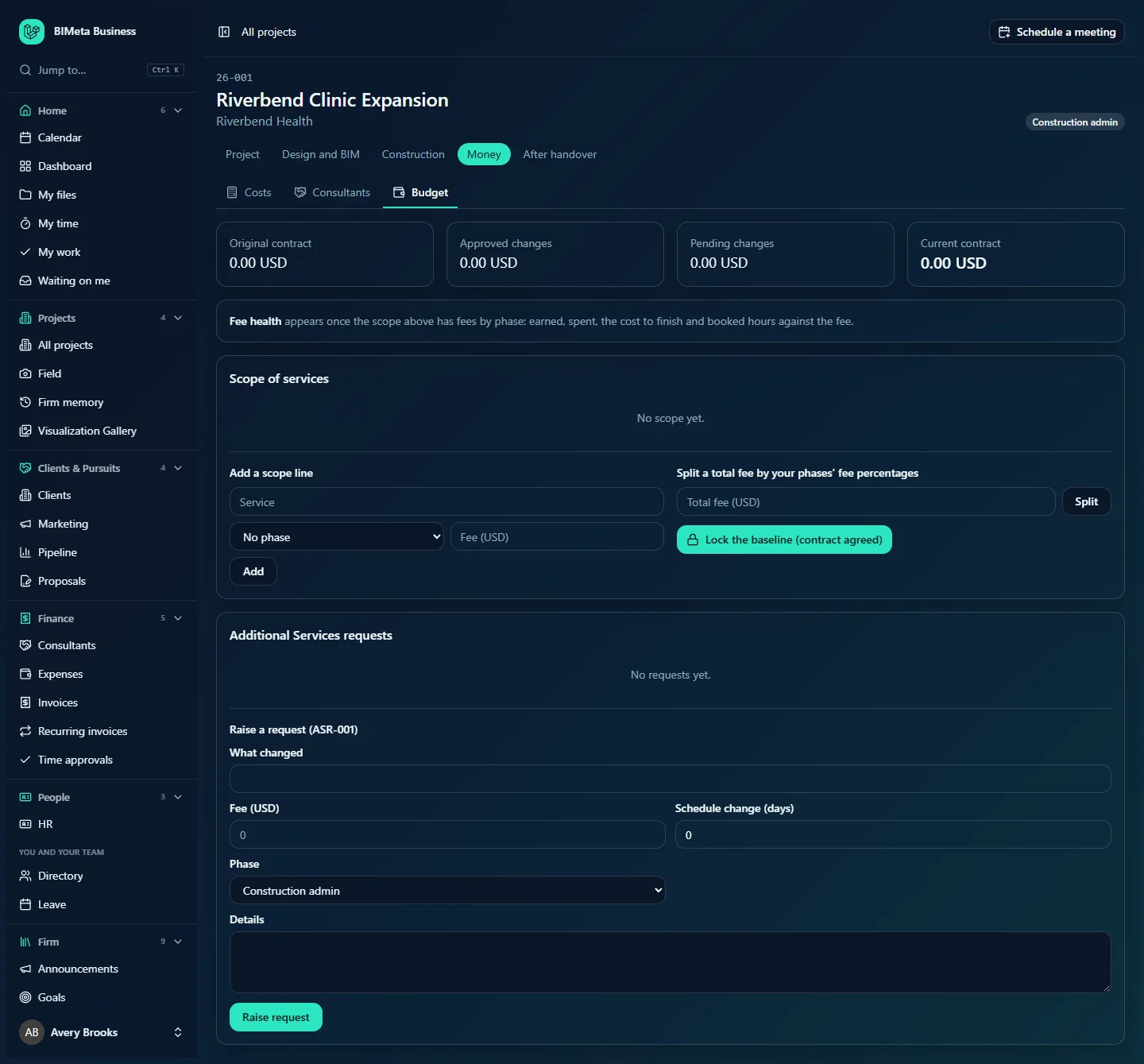
A tour of the page
Contract summary
- Original contract: the baseline scope total.
- Approved changes: approved Additional Services, with the schedule days they added (when any).
- Pending changes: requests waiting for a decision, with their schedule days (when any).
- Current contract: original plus approved changes.
Amounts are in the project's currency (your firm's currency unless the project has its own), e.g. 0.00 USD.
Fee health
Until the scope has fees by phase, a line explains that fee health "appears once the scope above has fees by phase". Then a card with a status badge (On track, Watch, Over fee or No progress reported yet) and the note "At cost rates. Earned is the fee times the percent complete reported for each phase.":
- Earned, with its share of the fee, e.g. "18,000.00 USD 30% of 60,000.00 USD".
- Spent: time booked so far at cost rates.
- Cost to finish, at this rate, with how much it's under or over the fee.
- Fee left after booked hours: fee left, minus hours already booked on the capacity board ("… left, … booked").
- A table by phase: Phase, Fee, Complete (percent), Spent (with hours), Fee used (a bar of fee used with a tick at percent complete: a bar running past the tick means the phase is burning faster than it progresses) and Cost to finish.
- Booked on the capacity board, next 8 weeks: a small bar chart of booked hours per week; hover a bar to see who is booked.
Construction cost
When the project has cost estimates on its Costs tab: Client's budget (the construction budget), Latest estimate with its stage and difference from the budget, and Fee as a share of construction cost, with a link to the Costs tab.
Scope of services
The baseline scope lines, each with its phase, description and fee, plus a badge on lines that came from an approved Additional service. Before locking, managers can remove a line. With no lines: "No scope yet." Under the list, for managers while the baseline is unlocked:
- Add a scope line: Service (description, up to 300 characters), phase (or No phase), Fee, and Add.
- Split a total fee by your phases' fee percentages: Total fee and Split.
- Lock the baseline (contract agreed).
After locking, the card shows Baseline locked.
Additional Services requests
Each request with its number (e.g. ASR-001), title, status (Pending, Approved, Rejected or Withdrawn), phase, fee, schedule change in days, details, Raised by and, once decided, Decided by with the decision note. Pending requests have Approve and Reject with a Note (optional) for managers, and Withdraw for the person who raised it. With none: "No requests yet."
The Raise a request form shows the number the request will get, e.g. Raise a request (ASR-001), with What changed (required, up to 200 characters), Fee, Schedule change (days), Phase (defaults to the current phase) and Details (up to 5,000 characters), and Raise request.
How to …
Set up the baseline line by line
- Under Add a scope line, type the Service, choose a phase and enter the Fee (e.g.
12500or12,500.00). - Click Add ("Scope line added"). Repeat for each service.
Split a total fee across phases
- Enter the Total fee and click Split.
- BIMeta replaces the baseline with one line per phase, using the fee percentages from Admin → Settings → Setup → Phases & fee split (a step in the Project standards section of Setup) ("Fee split across n phases"). Any rounding cents go to the last phase.
Lock the baseline
- When the contract is agreed, click Lock the baseline (contract agreed). You'll see "Baseline locked. Changes now go through Additional Services requests."
Raise an Additional Services request
- Fill in What changed, the Fee, the Schedule change (days) (positive to add time), the Phase and Details.
- Click Raise request ("Request raised"). It's numbered and shown as Pending, and its fee counts under Pending changes.
Approve, reject or withdraw a request
- Optionally type a Note.
- Click Approve or Reject (managers), or Withdraw (the person who raised it, or a manager).
Approving adds the request as a scope line marked Additional service and its fee to the Current contract. Every scope change, split, lock, request and decision is recorded in the audit log.
Tips and good to know
- Fees by phase drive fee health, phase billing in Finance and Reports → Fee earned, where percent complete per phase is set.
- Fees can't be negative in the baseline. You can't lock an empty baseline.
- Additional Services numbering comes from your firm's numbering settings, per project.
- Schedule changes can be up to 10 years either way.
Troubleshooting
"Your phases have no fee split yet."
Set fee percentages under Admin → Settings → Setup → Phases & fee split, or add scope lines by hand.
"The baseline is locked. Changes go through an Additional Services request."
Raise a request instead of editing the scope.
"Enter an amount like 12500 or 12,500.00."
Use digits with an optional decimal point and comma thousands separators, without a currency symbol.
I don't see the Budget tab.
You can't see fees on this project. Ask the project manager.
Was this article helpful?
Share