



Project assistant: what it may read and how questions are kept
16 views · by Kevin J Bruno · updated 7 hours ago
On each project, people can open the Assistant tab and ask questions in plain language, such as "Which RFIs about the roof are still open?" or "What did we agree about the lobby finishes?". The assistant answers from the project's own records. The Project assistant settings page decides, for the whole firm, whether people may use it, which kinds of records it may read, how much it sends to the AI with each question, and how long questions are kept.
Where to find it
- Sidebar → Admin → Settings, then Project assistant in the Apps and connections section. You can also type in Search settings at the top of the Settings page. A ‹ Settings link above the page title takes you back.
- Ctrl K and type
assistant,ai chatorproject assistant.
Since the menu was shortened, the firm's settings pages are no longer listed one by one in the sidebar: they are gathered on the Settings page under Admin, grouped into sections. Each person sees only the pages they may open there. Jump to… (Ctrl K) still finds every page, and you can pin a page to the top of your sidebar if you use it often.
Who can use it
Business Owners and Admins, who can switch AI features on or off. IT Staff, BIM Managers and Users can't open the settings; everyone at the firm can use the assistant on projects they're on, within these settings.
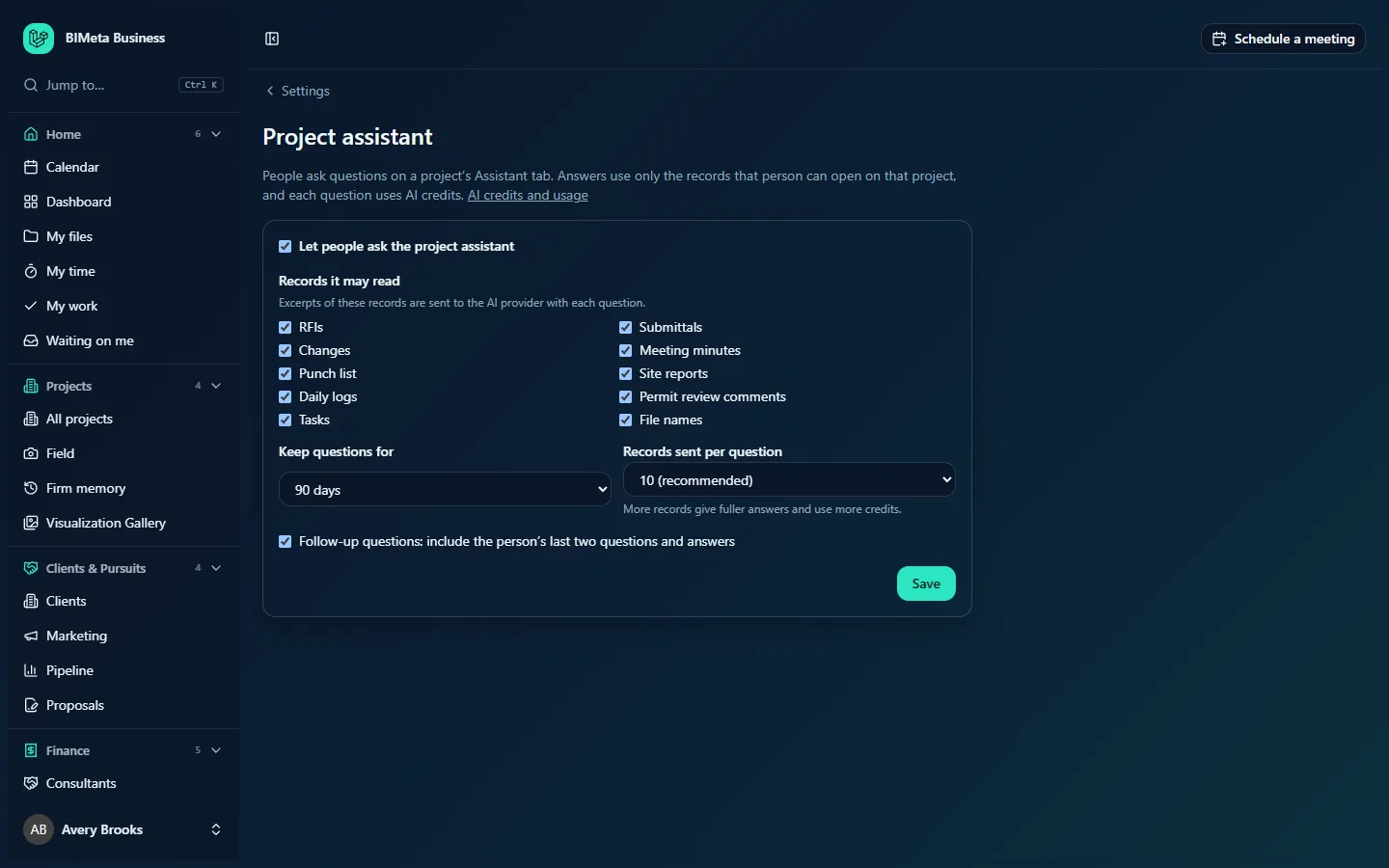
A tour of the page
The introduction explains the two rules that always apply: People ask questions on a project's Assistant tab. Answers use only the records that person can open on that project, and each question uses AI credits. The AI credits and usage link opens Admin → Settings → AI.
The settings card has:
- Let people ask the project assistant: the on/off switch for the whole firm. On by default.
- Records it may read: Excerpts of these records are sent to the AI provider with each question. Tick boxes for RFIs, Submittals, Changes, Meeting minutes, Punch list, Site reports, Daily logs, Permit review comments, Tasks and File names. All are ticked by default. (File names means just the names of files, not their contents.)
- Keep questions for: 7 days, 30 days, 90 days (default) or 365 days. Older questions and answers are deleted automatically.
- Records sent per question: 3, 5, 8, 10 (recommended), 15 or 20. More records give fuller answers and use more credits.
- Follow-up questions: include the person's last two questions and answers: lets people ask "and which of those are overdue?" without repeating themselves. On by default; it makes each question a little larger.
- Save.
How to change the assistant settings
- Tick or untick Let people ask the project assistant.
- Under Records it may read, untick any kind of record you don't want sent to the AI provider, for example Meeting minutes if they often hold confidential commercial discussion.
- Choose Keep questions for and Records sent per question.
- Tick or untick follow-up questions.
- Click Save. You'll see Assistant settings saved. The change is recorded in the Audit log and applies to the next question anyone asks.
How the assistant protects records
- It searches only the kinds of records ticked here and that the person asking can open on that project. A designer who can't see a project's changes won't get answers built from them.
- A question that names only kinds of record the person can't open is refused without calling the AI, so it costs nothing.
- Only short excerpts of the best-matching records are sent, up to the number you set.
- Each question uses AI credits. Typical cost and monthly limits for the Assistant feature are on Admin → Settings → AI.
Tips and good to know
- If AI features are switched off on Admin → Settings → AI, or IT blocked AI on records under Admin → IT → Security, the assistant won't answer even if it's switched on here.
- 10 records per question is a good balance. Raise it for big projects with many RFIs; lower it to save credits.
- Shorter Keep questions for periods suit firms with strict data-retention policies.
- Unticking every kind of record leaves the assistant nothing to read, so it can't answer. To stop it, untick Let people ask the project assistant instead.
Troubleshooting / FAQ
People say the assistant ignores some records.
Either that kind of record is unticked here, or the person can't open it on that project (their project role doesn't include it).
The assistant says AI is off or the budget is used up.
Check Admin → Settings → AI: the on/off switch, credits left and the monthly budget for Assistant.
Was this article helpful?
Share