



Licences & CE: professional licences, renewals and CE credits
18 views · by Kevin J Bruno · updated 1 day ago
Licences & CE is where you keep your professional credentials: architect or engineer registrations, licences, certifications such as LEED, and memberships such as AIA. Each one has its expiry date and the continuing education (CE) hours it needs per renewal. You log the courses and events you complete as CE credits, and the page shows how close you are to each renewal. The portal emails you before a licence expires. Human Resources, Business Owners and Admins also see a table of everyone's licences.
Where to find it
- Sidebar → People → HR, then the Licences & CE tab. HR is one menu entry that gathers the firm's HR tools as tabs across the top of the page. It opens on the Hiring tab; click a tab to switch. You only see the tabs you're allowed to open.
- Press Ctrl K (Jump to…) and type Licences.
- Dashboard card Licences to renew (HR, Owners and Admins): the number of licences expiring within 60 days or already expired; it opens this page.
- The link in a licence reminder email.
Who can use it
- Everyone on staff keeps their own licences and CE credits here. You can only add, renew and remove your own licences, and only log credits for yourself.
- Human Resources, Business Owners and Admins also see Everyone's licences, a read-only table of every licence in the firm.
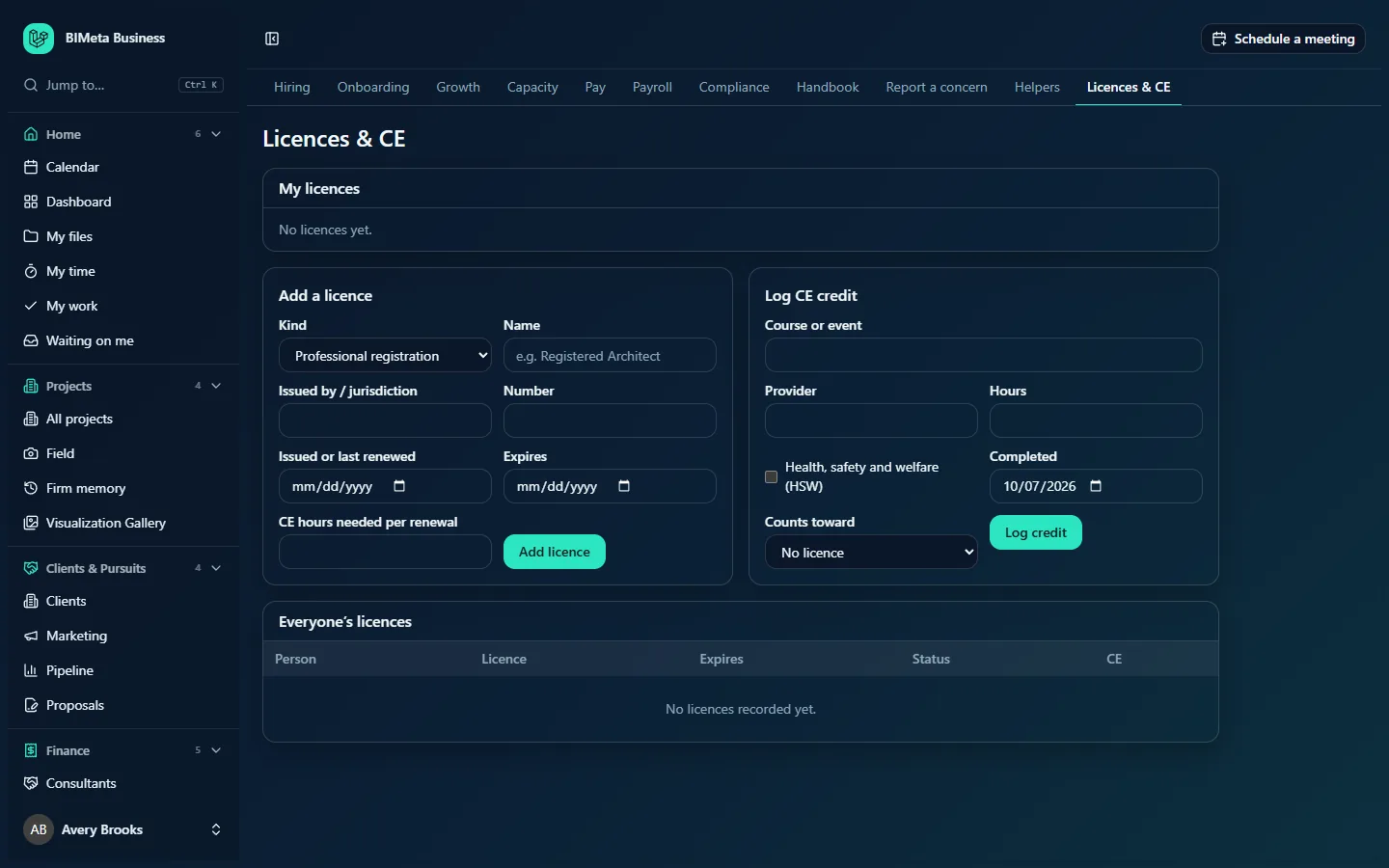
The screenshot shows a Business Owner at Northlight Architects before anyone has added a licence. Users see the same page without the Everyone's licences table.
A tour of the page
My licences
Your licences, soonest expiry first (licences without an expiry last). Each row shows:
- The licence name, and below it the kind, jurisdiction and number, for example Registered Architect · Professional registration · California · C-12345.
- A status badge: Current, Renew soon (expires within 60 days) or Expired.
- Expires date (or No expiry) and the CE hours, either 8 of 24 CE hours when the licence needs a set number per renewal, or 8 CE hours when it doesn't.
- A New expiry date field with a Renewed button, and a bin icon (Remove licence).
"No licences yet." when you haven't added any.
Add a licence
- Kind: Professional registration, Licence, Certification or Membership.
- Name (required, up to 160 characters), for example Registered Architect.
- Issued by / jurisdiction (up to 120 characters), for example California Architects Board.
- Number (up to 80 characters).
- Issued or last renewed and Expires: dates, both optional.
- CE hours needed per renewal: 0 to 500, optional.
- Add licence.
Log CE credit
- Course or event (required, up to 200 characters).
- Provider (up to 160 characters), for example AIA or a manufacturer.
- Hours (required, more than 0 and up to 100; decimals allowed, such as 1.5).
- Health, safety and welfare (HSW): tick if the course counts as HSW.
- Completed: the date you finished it (required; today by default; can't be in the future).
- Counts toward: one of your licences, or No licence.
- Log credit.
My CE credits
Appears once you've logged credits: each course with its provider and the licence it counts toward, the completion date and the hours, newest first.
Everyone's licences (HR, Owners and Admins)
A table with Person, Licence (with jurisdiction), Expires, Status and CE, soonest expiry first. "No licences recorded yet." when empty.
How to …
Add a licence
- Under Add a licence, choose the Kind and enter the Name.
- Fill in the jurisdiction, number and dates you have. Add the Expires date if it expires, so you get reminders.
- If the licence needs CE to renew, enter CE hours needed per renewal.
- Click Add licence. You'll see "Licence added".
Log a CE credit
- Under Log CE credit, enter the course or event, provider and hours.
- Tick HSW if it qualifies, and set Completed.
- Choose which licence it Counts toward, then click Log credit. You'll see "CE credit logged".
Record a renewal
- In My licences, pick the New expiry date on the licence's row.
- Click Renewed. You'll see "Renewal recorded". The status updates, and reminders start again for the new date.
Remove a licence
Click the bin icon on the row. The licence is removed straight away (there's no confirmation). CE credits you logged against it are kept, but no longer count toward any licence.
Tips and good to know
- Reminders: every morning the portal checks for licences expiring within 60 days. You get one email when a licence enters that window and another if it expires. Business Owners and Admins get one summary email listing everyone's. Recording a renewal resets the reminders.
- CE on this page counts the credits linked to each licence since its Issued or last renewed date (or over the last two years if that date is empty), so keep that date current when you renew.
- CE in Growth works differently: if HR has set up CE rules (for example AIA's 18 hours a year, 12 of them HSW), your Growth page counts all your credits in the rule's period against it, with HSW hours shown separately.
- Adding, renewing and removing licences, and logging credits, are recorded in the audit log.
- Store a scan of a certificate on your HR record by asking HR to add it as a Certificate document.
- If you agreed to share your milestones (on your HR record), the firm may celebrate a new licence in its posts. Every post is approved first.
Troubleshooting / FAQ
Why doesn't my CE total count a course I logged?
Either it wasn't linked to that licence under Counts toward, or it was completed before the licence's Issued or last renewed date.
Can HR update my licence for me?
The page only lets each person add, renew and remove their own licences. HR, Owners and Admins can see everyone's but change them only through the person.
I didn't get a reminder email.
Reminders need an Expires date, and are sent once at 60 days and once on expiry. If you renewed and then the date passed again, make sure you recorded the renewal with Renewed.
Was this article helpful?
Share