



Goals: set firm targets and track progress
16 views · by Kevin J Bruno · updated 16 hours ago
The Goals page shows the targets the firm has set for itself over a period, such as fees collected this year, billable hours this quarter, proposals won or projects opened, and how far along each one is. Most goals measure themselves from the firm's own records in BIMeta Business, so the progress bar is always up to date without anyone typing numbers in. Each current goal also says whether it is On track or Behind for the time that has passed.
Where to find it
- Sidebar → Firm → Goals.
- Jump to… (Ctrl K): type
goals. - The Goals on track card on the Dashboard shows how many of the current goals are on track, for example 2 / 3, and opens this page.
Who can use it
- Everyone on staff can see every goal and its progress.
- Setting goals (adding, updating progress by hand and removing) is limited to people allowed to set firm goals. By default that is the Business Owner and Admin roles. Only they see the New goal form, the Update box on hand-updated goals and the remove (bin) button. IT Staff, BIM Managers and Users see the goal cards only.
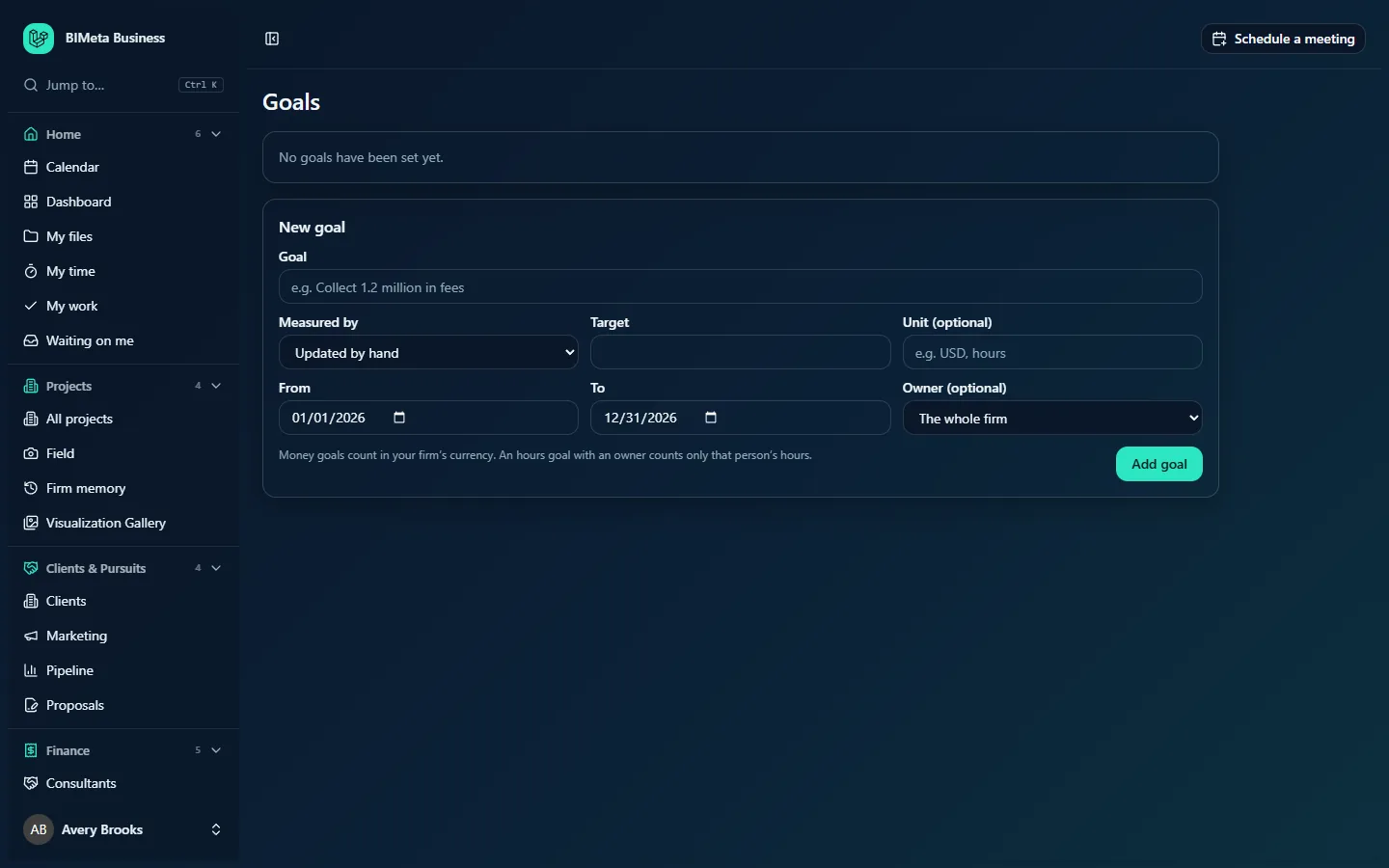
The screenshot shows a Business Owner's view of a firm with no goals yet: the empty message and the New goal form. Other roles see only No goals have been set yet. until goals are added.
A tour of the page
Goal cards
Each goal is a card, two to a row. Current goals come first, then upcoming ones, then past ones; within each group the goal that ends soonest is first. A card shows:
- Title, for example Collect 1.2 million in fees.
- Status badge:
- For a current goal: On track or Behind (red).
- For a goal that hasn't started: Starts and its start date.
- For a goal whose period is over: Ended.
- A line of details: how it's measured (for example Money received), the owner if it has one, and the period (2026-01-01 – 2026-12-31).
- Progress bar and a line such as 312,500 of 1,200,000 USD (26%): the value so far, the target, the unit you gave it, and the percentage. The percentage stops at 100% even if the target is beaten, but the value keeps counting.
- For goal setters: an Update box (only on goals Updated by hand) and a bin button to remove the goal.
How each goal is measured
| Measured by | What counts towards it, between the From and To dates |
|---|---|
| Updated by hand | Whatever number a goal setter last typed in the Update box. Use it for anything BIMeta Business doesn't track, such as a number of CPD sessions run or a client satisfaction score. |
| Money received | Client payments recorded against invoices, by the date they were paid. |
| Amount invoiced | The amount before tax of every invoice that has been issued (drafts and voided invoices are left out), by issue date. |
| Hours logged | Hours on timesheets that have been submitted or approved (drafts don't count), by the day worked. If the goal has an owner, only that person's hours count; otherwise everyone's. |
| Projects opened | Projects created in BIMeta Business during the period. |
| Proposals won | Proposals marked accepted, by the date the decision was recorded. |
Money goals count in the firm's currency, as whole currency units (not cents).
On track or Behind?
A current goal is On track when its value so far is at least the target multiplied by the share of the period that has passed. For example, a goal running January 1 to December 31 with a target of 1,200,000 is about 75% through its period on October 1, so it needs at least 900,000 by then to be on track. The pace is assumed to be even across the whole period, so seasonal goals may show Behind early on even when things are going to plan.
New goal (goal setters)
- Goal (required): the name, up to 200 characters.
- Measured by (required): one of the six measures above. Defaults to Updated by hand.
- Target (required): a number above zero. Decimals are allowed.
- Unit (optional): up to 20 characters shown after the numbers, for example USD or hours. It's a label only; it doesn't convert anything.
- From and To (required): the period. They default to January 1 and December 31 of the current year. To must be on or after From.
- Owner (optional): The whole firm (default) or one active person. The owner is shown on the card; for an Hours logged goal it also limits the count to that person's hours.
- Add goal: saves it. You'll see Goal saved.
How to…
Set a firm goal measured automatically
- In New goal, name it (for example Bill 9,000 hours this year).
- Choose Measured by, for example Hours logged.
- Enter the Target (9000) and a Unit (hours).
- Check the From and To dates, leave Owner as The whole firm, and click Add goal.
The card appears with its progress already calculated from existing records. Goals use the firm's whole history, so a goal whose period started months ago immediately counts everything since its start date.
Set a personal hours goal
Choose Hours logged and pick the person in Owner. Only their submitted and approved hours in the period count.
Update a hand-measured goal
- On the goal's card, type the new total (not the increase) in the Update box. It starts filled with the current value.
- Click Update. You'll see Progress updated.
Goals measured from records have no Update box; they update by themselves.
Remove a goal
- Click the bin icon on the card.
- Confirm Remove this goal?. The goal is deleted for everyone.
Change a goal's target or dates
The page has no edit form for existing goals. Remove the goal and add it again with the new details. For automatically measured goals nothing is lost, because progress is recalculated from the records.
Tips and good to know
- Goals don't send reminders or notifications. The Dashboard card Goals on track is the quickest way for everyone to keep an eye on them.
- Amount invoiced and Money received come from Finance → Invoices; Hours logged from timesheets (Home → My time); Proposals won from Clients & Pursuits → Proposals; Projects opened from Projects. If a number looks wrong, check the source page first, for example invoices still in draft or timesheets not yet submitted.
- Saving, updating and removing goals is recorded in the audit log.
Troubleshooting
Why can't I add a goal?
Only people allowed to set firm goals (by default Business Owners and Admins) see the New goal form.
My goal says Behind but we're doing fine.
On track assumes steady progress through the whole period. Work that is billed or paid in bursts (for example at phase completion) can look behind between milestones.
I get "This goal is measured from the firm's records and updates by itself."
Only goals set to Updated by hand accept typed progress.
Was this article helpful?
Share