



Firm memory: search what every project already asked and answered
19 views · by Kevin J Bruno · updated 21 hours ago
Firm memory searches what every project has already asked and answered: RFIs, submittals, changes, meeting minutes, permit review comments and clashes. Before you write a new RFI about parapet flashing at a curtain wall, search here to see how the same question was answered on another job. Records that got an answer rank first.
Where to find it
- Sidebar → Projects → Firm memory.
- Jump to… (Ctrl K): type "memory".
- The same search runs quietly while you write a new RFI, suggesting answered RFIs from other projects that look similar ("asked before").
Who can use it
Everyone: Business Owner, IT Staff, BIM Manager and User. Each kind of record is searched only on projects where you could open it on its own tab:
- RFIs, submittals, changes and meeting minutes: projects where you can see construction admin.
- Permit review comments: projects where you can see permits.
- Clashes: projects you can see.
So two people can get different results for the same search.
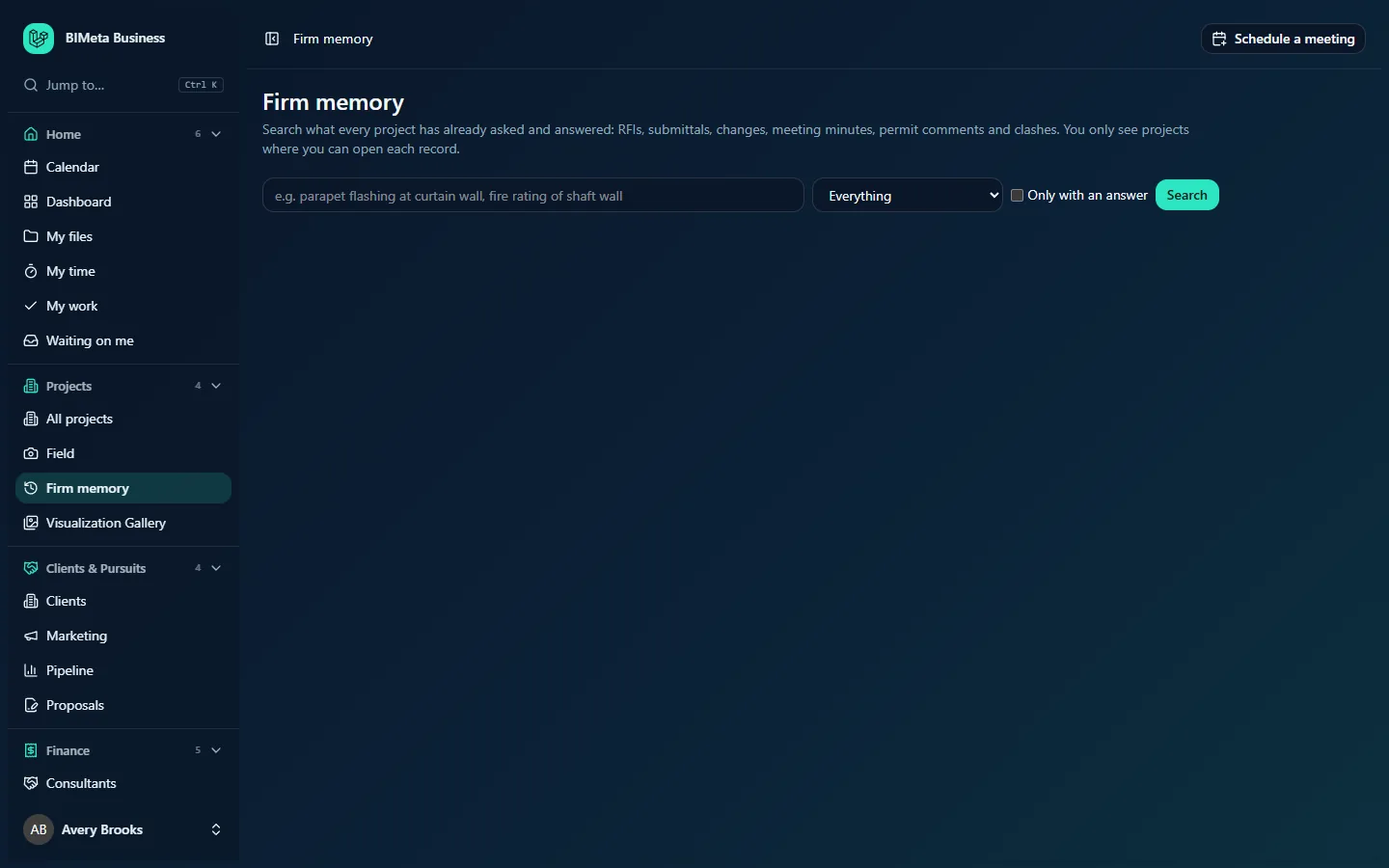
A tour of the page
- The explanation: "Search what every project has already asked and answered… You only see projects where you can open each record."
- What to look for: the search box, e.g. parapet flashing at curtain wall, fire rating of shaft wall (up to 300 characters are used).
- Kind of record: Everything, RFIs, Submittals, Changes, Meeting minutes, Permit review comments or Clashes.
- Only with an answer: tick to leave out records that were never answered.
- Search.
Results
A count ("1 record" or "n records, best matches first"), then up to 40 results, each with:
- A badge with the kind of record, the project number and name, and the date, e.g. RFIs · 25-018 Riverbend Wellness Center · 2025-11-03.
- The record's title as a link to the record itself.
- A snippet of the matching text.
- Answer: the answer it got, when there is one.
If nothing matches: "Nothing on your projects matches that yet. Try fewer or different words."
How to …
Search the firm's memory
- Type a few key words (materials, assemblies, spec sections, code terms).
- Optionally choose a Kind of record and tick Only with an answer.
- Click Search.
- Click a result's title to open the full record on its project.
Tips and good to know
- Fewer, specific words work best:
shaft wall fire ratingrather than a full sentence. - Results link into the original project, so you can see the whole thread, attachments and who answered.
- Searches are logged (who searched and how many results) but not shared with anyone.
- To ask a question about one project in plain language, use that project's Assistant tab.
Troubleshooting
I know a project had this RFI, but it doesn't show up.
You may not have construction admin access on that project, or the wording differs. Try other words, or ask someone on that project.
The page is empty.
Nothing is shown until you search.
Was this article helpful?
Share