



Estimates: price range, timeline and what's included
17 views · by Kevin J Bruno · updated 3 hours ago
An estimate is BIMeta's first idea of what the work will cost and how long it will take. It's a range, not a promise, so you can decide early whether the job is worth pursuing. Nothing is agreed by an estimate: the binding offer is the proposal that follows.
Where to find it
On the request's page, in the Estimate section (below the proposal, above The request). When BIMeta sends one, the person who asked is emailed (Your estimate for …) with the range and the timeline, and the request moves to Estimated if it was still being scoped.
Who can use it
Everyone who can open the request can read estimates. There's nothing to accept: ask questions in the conversation.
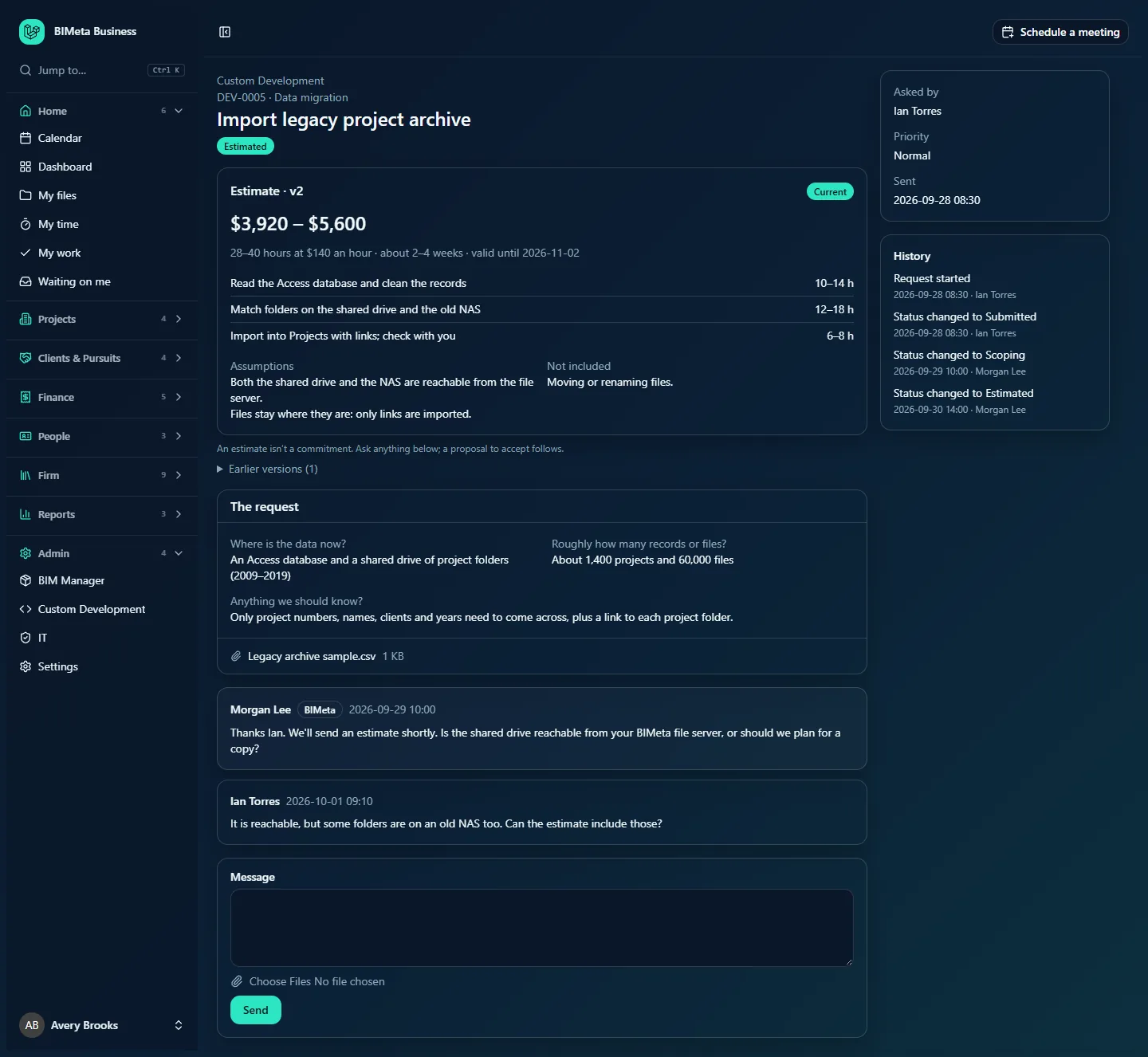
A tour of an estimate
- Estimate · v2: the version. Each new estimate gets the next version number.
- The badge: Current (the latest one sent), Expired (its valid until date has passed), or Replaced by a newer version.
- The range, for example $3,920 – $5,600.
- How it's priced:
- By the hour: 28–40 hours at $140 an hour. The range is the hours × the rate.
- Fixed price: the range is the total of the lines, or a range given directly.
- Timeline: about 2–4 weeks, when BIMeta gives one.
- valid until: the date the estimate stays valid until (30 days unless BIMeta sets another date).
- Lines: the parts of the work with their hours (for example 12–18 h) or amounts (for example $1,600 – $2,000).
- Assumptions and Not included: what the range depends on, and what it doesn't cover. Read these carefully: they are the usual source of later changes.
- Under the section: An estimate isn't a commitment. Ask anything below; a proposal to accept follows.
- Earlier versions (n): click to see previous estimates.
How to…
Question or adjust an estimate
- Read the lines, the assumptions and what's not included.
- Write in the Message box what you'd like changed or explained (for example "Can the estimate include the folders on our old NAS?").
- BIMeta replies and may send a new version; the old one is then shown as Replaced by a newer version.
Tips and good to know
- If BIMeta withdraws an estimate it disappears from your page.
- For work billed by the hour, the estimate's highest number of hours is used as the budget for the hours bar when there's no hourly proposal (see Plan, progress and hours against the budget).
- BIMeta's team may use an AI-drafted range from similar past jobs as a starting point. A person always checks it, and you only ever see what they send.
FAQ
The estimate says Expired. Is it still useful?
Yes, as a guide, but prices may have changed. Ask in the conversation for an updated estimate or go straight to a proposal.
Do I need to accept the estimate?
No. Estimates have no buttons; you accept the proposal.
Was this article helpful?
Share